Module 6: Video Recording
Welcome!
Hey there!
Welcome to Module 6 of Low-Ticket Product Creation, a mini-course inside of Low-Ticket Launchpad.
In this module, I’m going to give you a crash course on recording videos.
Specifically:
Different approaches you can take to creating digital product videos
Faulty beliefs people have around recording videos
And how to set yourself up for success (so you aren’t trying to record 100 videos in a day!)
I really wish someone had explained these things to me when I first started creating/launching digital products.
So let’s dive in!
5 Video Recording Faulty Beliefs
The video component is probably “the thing” that holds people back from creating digital products the most.
Not for any logical reason, but because “video” has a way of igniting all sorts of very emotional faulty beliefs.
So, let’s dismantle these first!
Faulty Belief #1: “My digital product videos need to be professional, highly edited, and perfect.”
Wrong, wrong, and wrong.
One of the beauties of creating education products is that product quality really doesn’t matter.
In fact, I’ve found the vast majority of the time that the opposite is actually true:
The higher the production quality, the lower the value of the information shared.
The lower the production quality, the higher the value of the information shared.
If you notice, all the “highly produced” digital products and online courses tend to be from people who haven’t actually done the thing they’re selling at a very high level.
Whereas all the people who really know their shit just turn on a basic webcam, hit record, and share what they’ve learned.
You do NOT need high production quality to make a valuable digital product.
Faulty Belief #2: “Video is so hard because if I mess up I have to start over.”
Don’t think of recording videos like they have to be this perfect, vacuum-sealed sort of thing.
Just imagine yourself giving a talk to a small room of people, and someone decided to record it.
That’s all your videos have to be.
You can mess up.
You can go on tangents.
You can take a sip of water.
You can say “ummm” and “like” 100 times.
It doesn’t matter.
The ONLY thing that matters is whether or not you successfully help the reader.
And if you’re able to do that, then a few tangents and a handful of “ummms” peppered in there isn’t going to matter.
You achieved your goal.
Faulty Belief #3: “I need to buy a teleprompter and write scripts for all my videos.”
You can.
But you don’t have to.
Look at what I’m doing, right here. All I’m doing is talking over a Notion doc.
Faulty Belief #4: “I’m camera shy and don’t want to show my face.”
That’s totally fine.
Just record your screen and do a voice over on a Notion doc, a presentation, or a software tool you’re doing a walkthrough of.
This is what Sam Ovens used to do for some of his digital products/course modules.
Faulty Belief #5: “I’m not a good speaker, so this is going to be really hard for me.”
Funny how many people say they “aren’t good speakers,” but then if asked the right question will talk somebody’s ear off at a dinner party.
Again, you do not need to be a professional speaker.
Don’t even think of it like you’re “public speaking.”
Just imagine your friend asked you to walk them through how to solve a specific problem, and you decided one afternoon to sit down, record your screen, and tell them the answer.
That’s all your digital product has to be.
Practice In Public: Start on YouTube
If you are having a LOT of resistance around creating videos for your digital product, then you need a vehicle to overcome your fear.
And the only way to overcome your fear is to run straight at it.
Aka: Practice In Public.
Start on YouTube
This would be my recommendation.
Start making free videos on YouTube talking about your niche.
Don’t overthink it. The measure for success is not “I made the perfect video.” The measure for success is “I successfully posted a video,” because that’s going to be the path to you overcoming your fear.
Make the creation as easy as possible. I recommend just talking over a Google or Notion doc.
Do this 20 times.
Compared to my videos today, you can hear:
I’m not quite as well-spoken
I sound more hesitant/uncertain/less confident
I don’t have as much clarity of thought
Etc.
But that’s fine. Because it was my first video!
And look how much I’ve improved since then.
“But Cole?! I don’t want to waste months creating content on YouTube! I want to make money & build a digital product!”
Well, you only have 2 options:
Somehow magically get over your fear of recording videos and start building your product.
OR, find a different vehicle to overcome your fear, faster—and start on YouTube (for free).
Either way, it’s not wasted time.
YouTube is only going to make you better: a better speaker, a better presenter, a better framework creator, etc.
But more importantly, all that practice on YouTube will a) help you build/expand your audience, and b) make it 100x easier for you to create digital products & course modules on a lot of similar topics.
Video Recording Tech Stack
Recording videos is not that hard.
But there are a few small things you can do to increase the quality (and make things easier for you).
Here are my recommendations on platforms and gear:
Recording Videos: Loom
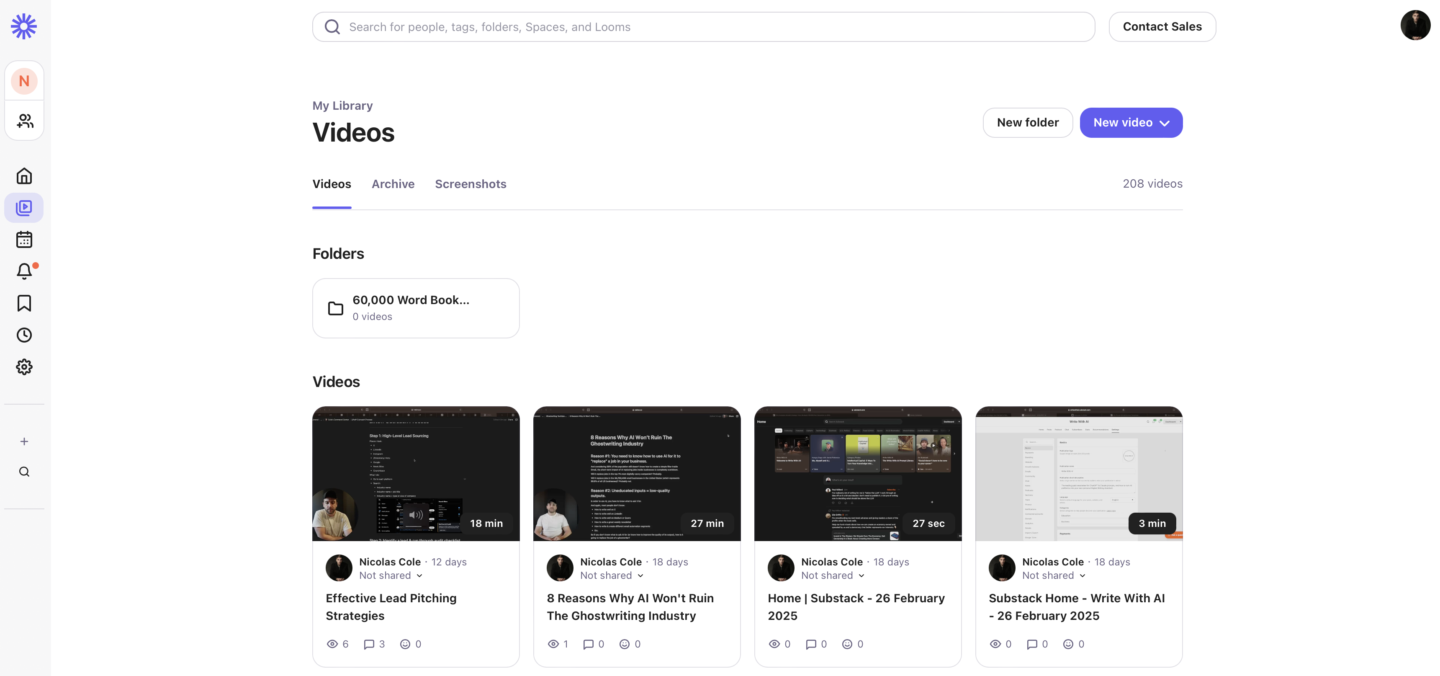
Loom is my favorite platform for quickly & easily recording videos straight on your computer.
You can record with your face.
Or you can record just your screen w/ voice over.
You can store all your videos in your account. And you can easily download the files, and then upload to your preferred course hosting platform.
*Alternative: Screen Studio.
Screen Studio is pretty cool. It’s a bit more advanced, but it does produce a higher-quality looking video. Up to you on which one you want to use, but figured I’d note it as a secondary option.
Lighting
Loom (and other video recording software platforms) now have some AI enabled that helps fix lighting automatically through whatever camera you’re using, which is pretty cool.
But if you work from a room that has really terrible lighting, then I would grab some basic studio lights like these Softbox Lights on Amazon.
They’re pretty basic, and not “super high quality,” but they get the job done.
I have 2 of these in my home office.
Lighting Tips
If the window in your room is behind you, change locations and/or layout of the room. Very hard to fix being completely back-lit.
If the window is to your left, you need a studio light on your right to balance things out. (Otherwise, the left side of your face will be lit and the right side of your face will be a big shadow.)
If the window is to your right, you need a studio light on your left to balance things out. (Same thing, opposite direction.)
If the window is straight ahead of you, then chances are your natural lighting is completely fine.
Don’t obsess over lighting.
Just make sure you don’t look like a hostage victim and you’ll be fine.
Audio Recording
When you record videos inside Loom, the audio gets recorded too.
Which means you have a couple different options:
Option #1: If you are working in a room with a lot of soundproofing (carpet on the floor, furniture, things that soak up sound, etc.) then you can probably get away with just using your laptop microphone.
Option #2: If your room isn’t very sound-friendly (lots of echos, etc.) then you should probably buy a microphone. The cheapest option is to go with something that plugs straight into your laptop, like this Blue Yeti USB mic.
Option #3: Either way, if you want the highest-quality sound option, your best bet is this combo: Shure SM7B Microphone with this Focusrite Scarlett 2i2 mixer. And don’t forget an XLR cable to connect the mic to the mixer!
If you’re a complete beginner, I would strongly encourage you to just go with Option #1 or Option #2.
Option #3 isn’t that difficult, but there is a slight learning curve to using pro-grade audio (even if it’s just connecting 2 cables!).
Video
Similar to Audio, you have a couple different options when it comes to recording videos and increasing your video quality:
Option #1: Laptop/Webcam. Especially if you have good natural lighting, this is totally fine and more than enough for your first digital product. If you’re a complete beginner, I would recommend you just start here. You can always improve things as you go (and inevitably when you create your next product!).
Option #2: Sony 6400. If you want something more pro-grade, this is the camera I use (and am recording on right now). The Sony 6400, on a small tripod.
That said, Option #2 does come with a learning curve. It’s definitely a process getting your camera hooked up to your laptop (and I am not the best person to explain to you how to do it, since different cameras have different requirements with different laptops/computers, etc.). So ONLY go with this option if you feel comfortable figuring things out on your own.
Otherwise, just make sure you have good lighting and use your laptop’s camera.
Video Recording Tips
This is the most valuable section I can give you here—and it’ll seem super basic, but I promise it’s worth hearing.
Tip #1: Do not record for more than 4 hours in a day.
DO NOT save all your video recording for “the night before the product goes live.”
DO NOT try to record “all your videos” in 1 sitting.
DO NOT push yourself to record for 6+ hours in a row.
I promise, none of these things work. And they all lead to really low-quality end results.
I have probably spent over 2,000 hours at this point recording videos for our various products & programs. And one of the biggest lessons I’ve learned is that recording videos is taxing. It’s taxing on your voice. It’s taxing on your attention span & brain. It’s significantly more taxing than writing or even being on calls.
Recording videos “demands” something a little extra from you.
Which is why I STRONGLY recommend breaking it up, and never recording more than 4 hours of content in a day.
Past 4 hours, you’ll start to notice your brain quit on you.
Tip #2: Drink lots of water (way more than you’re used to).
On days I’m recording videos, I will drink more than a gallon of water all throughout the day.
The reason this is so important is because when you’re talking “that much,” especially non-stop on videos, your throat gets really dry.
Like… really dry.
And if you don’t rehydrate, you’re going to notice the next day that your throat is completely fried.
Take this seriously!
Drink lots and lots of water!!!
Tip #3: After you’re finished recording for the day, have a cup of hot water/tea, honey, and lemon.
It’s like finishing a workout and going into the sauna to recover, except for your throat.
Again, these little tricks really do make a big difference in terms of recovery—especially if you’re recording for 2+ hours per day, every day, for days on end.
I’ve put myself through some brutal sprints to create digital products in extremely compressed time periods, and I can honestly say these little recovery tips had a huge impact on my endurance.
Tip #4: Double-Check your video & sound before you start recording a long video.
I’ve made this mistake so many times, and it’s brutal every time it happens.
Before you begin recording a long video, do a quick test inside Loom.
Record a 15 second video.
Make sure Loom is picking up the right camera feed.
And make sure Loom is pulling audio from the correct source.
Trust me, you do NOT want to find out 45 minutes later that your audio cable was never plugged in.
Tip #5: Name each video file in your Loom library coinciding with the outline of your digital product.
Don’t just record Looms and dump them all into your Loom library with no naming conventions.
You’re going to want to stay organized—so later, you can match the right video files up with the right modules/sections.
Here’s the naming convention I like to use:
(Product Acronym)
Module Number
Section Title
Let’s use this module/section as the example:
My naming convention for this video file is…
- (LTL) Module 6: Crash Course on Recording Videos - Video Recording Tips
Module 6 Exercise
That’s it for Module 6 of Low-Ticket Product Creation!
If you feel confident diving right into creating your digital product and recording videos, by all means, get to work!
But if not, and you want to rack up some hours of practice first, I strongly encourage you to start on YouTube.
Use me and Dickie as examples here! This is how we both started out, and is what we recommend to every new creator who wants to get into video/improve their video talking skills (at any point in their journey).
*And by the way, this format of just talking over a Notion Doc (or whatever platform you prefer) is a format we keep using… because again, production quality doesn’t matter! The only thing people care about is the value of the information.
Plenty of examples on my channel, like this one, for you to mirror.
Key takeaways
TODO - For Ray