Bonus: Viral Drop Strategy
Welcome!
Hey there!
Welcome to Bonus Module 10 of Low-Ticket Product Marketing & Monetization Mastery, a mini-course inside of Low-Ticket Launchpad.
In this module, I’m going to show you how to attract thousands of subscribers to your email list using our Viral Drop Strategy.
Specifically, I’ll explain:
What a “Viral Drop” giveaway is and how it works
How to create a “Viral Drop” asset you can use as a “trade” for a person’s email address
Everything you need to launch your giveaway: social posts, delivery emails, and strategies for X and LinkedIn (including templates!)
This is how you can effectively capture thousands of dollars worth of customer acquisition…. for free.
What Is a Viral Drop?
Put simply, a Viral Drop is a way of making one of your social posts go viral to attract news subscribers to your email list.
In a Viral Drop, you boost the reach of a post by offering a freebie in exchange for interaction with the post. And it’s a super effective way of generating attention on social media, gaining followers, and adding new subscribers to your list.
So, how do you make something go viral?
How To Make Something Go Viral
Here's a quick crash course on how things “go viral.”
Every social platform has an algorithm.
That algorithm is weighted by different variables like Likes, Comments, Retweets/Shares, Bookmarks, etc.
When a piece of content receives a disproportionate amount of any one of these variables, in a short period of time, the algorithm pays attention.
When the algorithm “thinks” a piece of content is starting to get a lot of attention, it distributes that content to more and more people.
Until eventually, the attention starts to plateau, and the algorithm decides to move on and prioritize the next piece of rising content.
This is true for Twitter and LinkedIn, but also for every other social platform too: Facebook, Instagram, YouTube, Medium, Quora, etc.
(So yes, you can use this system across any social platform you’re on!)
They all work this way.
Which means, the “secret” to igniting virality (or at least giving yourself the best chance possible for going viral) is to cause a surge in engagement—right away.
“But how do I spark engagement?”
Ah, here's where things get interesting!
Sometimes, a piece of content can go viral on its own (and your autoplug strategy we talked about in Module 6 will handle the new sign ups). But this leaves things up to chance—and when you really want to maximize attracting new subscribers, you don't want to gamble.
What most people do when they want to “spark engagement” is they just ask readers:
“Comment below!”
And what happens?
…nobody comments.
The reason is that just because you ASK people to do something, doesn't mean they are going to do it. Right? (We're not a bunch of mindless zombies who do whatever people ask us to do!)
The whole KEY to getting people to engage with a post is to tell them WHAT THEY ARE GOING TO GET IN RETURN. Remember: it's a trade. If they are going to trade you seconds or minutes OFF THEIR LIFE, what are you going to give them in exchange? (And it better be good!)
Well, here’s the answer:
You give them access to a new asset you’ve never released before.
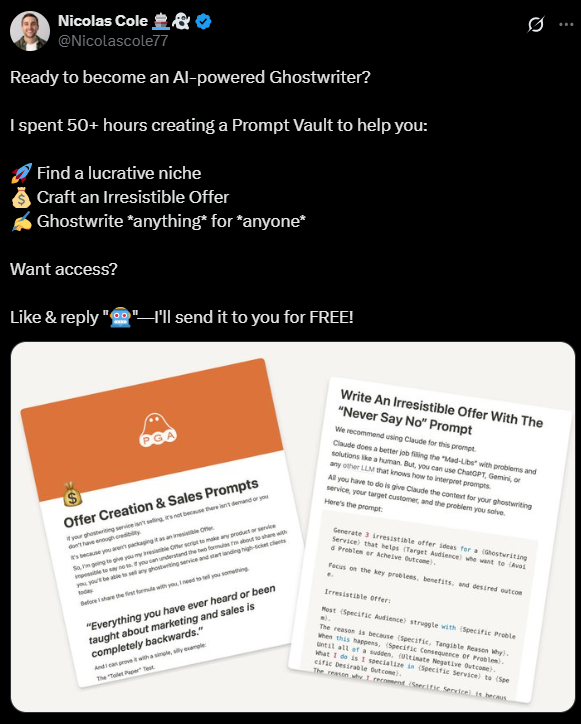
https://x.com/Nicolascole77/status/1809212033461629310
Let’s look at how to create this asset you can give away during a Viral Drop.
Creating Your Viral Drop Asset
To maximize the reach of your social post, you have to create something of “value.”
Now, every marketing influencer on your favorite social platform says, “Deliver value!!!!” but what does that actually mean?
A product has value when it hits on these 3 areas:
When it delivers a tangible outcome for the reader (e.g. “How to make your first $1,000 as a course creator”).
When it is a distillation and curation of knowledge they’d struggle to get anywhere else (e.g. when you’ve spent days, months, even years perfecting what’s inside).
When it “feels” like a product because it has a name e.g. “The Digital Course Kit” sounds more like a complete product than “3 checklists”. This could be a Blueprint, an Ultimate Guide, a Dashboard, a Template Pack, etc.
So, how do you decide what kind of asset you want to create?
Step 1: Find Your Viral Drop Idea & Name Your Asset
Before I dive in here, it’s important that to note this is a two-way process.
Deciding on the title of the asset (and the outcome it delivers) will dictate the content you include. But to find the title for your asset, you need to examine your content to see what could be used in a asset. Then once you’ve refined the title again, you might want to include another set of content in the asset.
And so on and so on.
So let’s start by finding come content ideas.
There are two main buckets of content you can use to create your Viral Drop Asset:
Repurposed content. This can found in two sub-buckets:
a**. Expand popular social posts and newsletters**. You’re taking proven content, expanding it (using the 10 Magical Ways to expand any piece of writing), and packaging it up into a product.
b. Repackaged newsletters. Take individual newsletters and package them up into an Ultimate Guide, A Blueprint, A Step-by-Step guide, etc that will drive an outcome for your reader.
c. Content from your Low-Ticket Digital Product. Yes, you can give away snippets of your product for free. Pick a section that gives a particular outcome for a reader, but make sure to hold something back (like a templates, etc)—you don’t want to give away a full section of your product!
New content. If you have a new framework or set of ideas that you think will be of benefit to your target readers/potential customers, then package them up into an asset. Sprinkle in proven content, too and you’ll bump up the value of the asset even more.
Once you have the content, it’s time to think of the Title and Subtitle of your Viral Drop asset.
These should hit on the 3 following areas:
Has a clear name (e.g. “The Premium Ghostwriting Blueprint”).
Calls out the intended audience (either directly or indirectly).
Feels “tangible” by:
Has a clear promise / outcome (e.g. “5 Steps to Become a Premium Ghostwriter”).
Uses numbers and specifics that the reader can actually hold.
To get your creative juices flowing, here are some of the viral drop assets I’ve created over the last 2 years (that have attracted thousands of subscribers to our newsletters):
The Digital Course Kit: 3 Checklists To Package Your Expertise & Make Your First $1,000
The Yearly Review: Your In-Depth Reflection Guide for 2024.
The Ghostwriter Prompt Vault: 14 Easy-To-Use Prompts To Start And Scale Your 1-Person Ghostwriting Business
You’ve got the name and content.
Now it’s time to build the asset!
Step 2: Write and Build Your Viral Drop Asset
The key to writing and building a high-value Viral Drop Asset is to give it a clear structure and make it easy to navigate.
Remember, you’re giving something good in exchange for a few seconds of your reader’s time, so it’s important to make sure that a) the asset delivers on the promises you make and b) is easy to use.
You want your “free” stuff to feel as a good as your paid stuff:
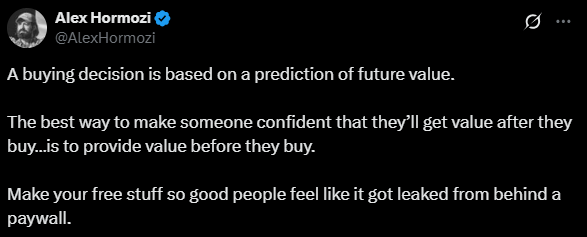
So, one of the best ways to do this (and make it feel even more like a product), is to make it easy to navigate.
(I build all of my Viral Drop Assets in Notion, but you can use platforms like Skool or Circle if you’d like).
Let’s look at an example from a Viral Drop I performed: The Ultimate Guide To Organic Lead Gen As A Ghostwriter.
Notice how there is a clear roadmap laid out in this asset:
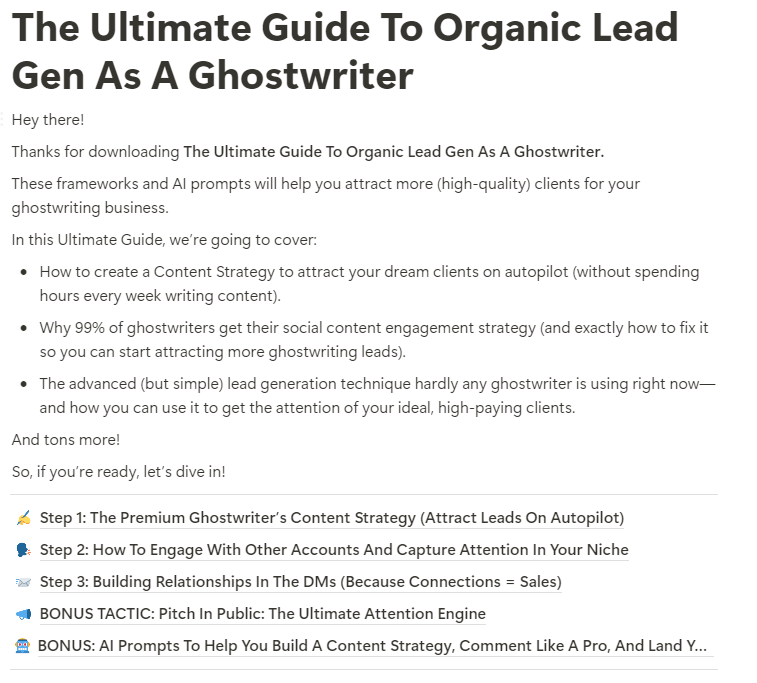
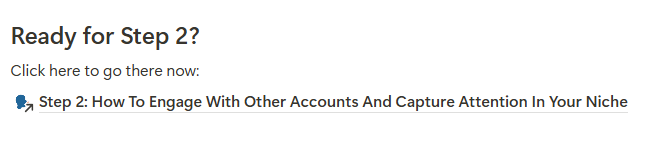
And then within each Step, it’s easy to move to the next stage:
Click here to see the complete Ultimate Guide To Organic Lead Gen As A Ghostwriter.
Alright, now you have your asset complete, it’s time to create the assets you’ll need to promote and distribute the asset.
Step 3: Create The Supporting Assets
There are 6 main assets you need to launch your Viral Drop:
A Landing Page
A Giveaway Post
A Delivery Message
A Follow-Up Post
A Promo Email (Optional but recommended)
An Asset Delivery Sequence
Writing Your Landing Page
This is where your reader will enter their email so they can a) get access to the asset and b) be added to your email list.
Here are some guidelines for writing a high-converting Viral Drop landing page:
Be clear, not clever in all your copy (especially your headline)
Use a Product image (again, this makes the asset feel more “real”).
Include a “Here’s What You’ll Get Inside” section and list out all the benefits the asset delivers
To give you a template to follow, here’s one of our Viral Drop landing pages:
https://ghostwritingleads.com/
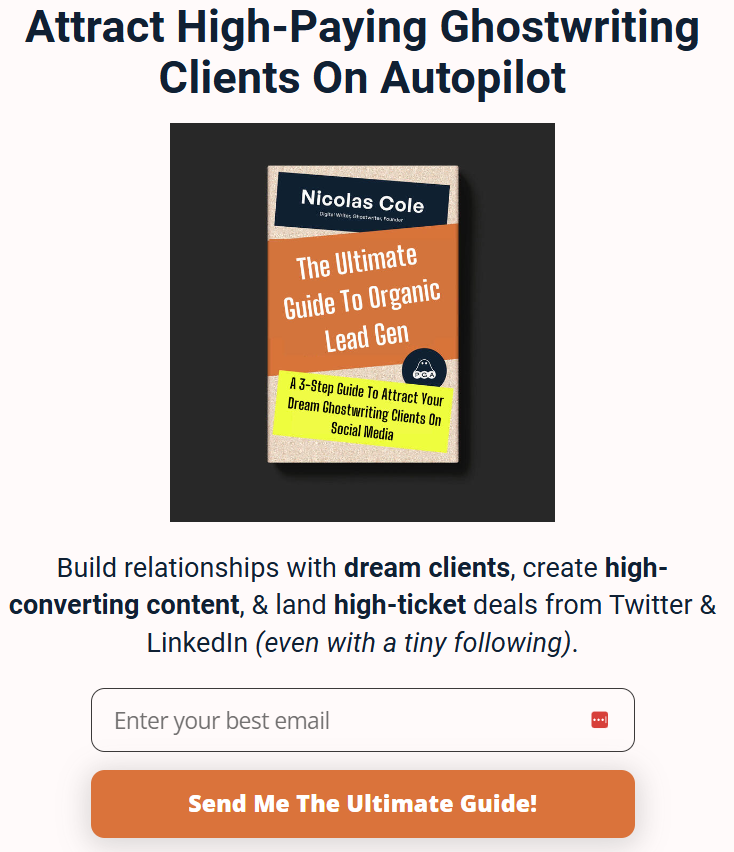
Pro Landing Page tips:
Use a dedicated domain for your landing page (again, this makes it feel like a “product”). Use Namecheap.com to find a relevant domain.
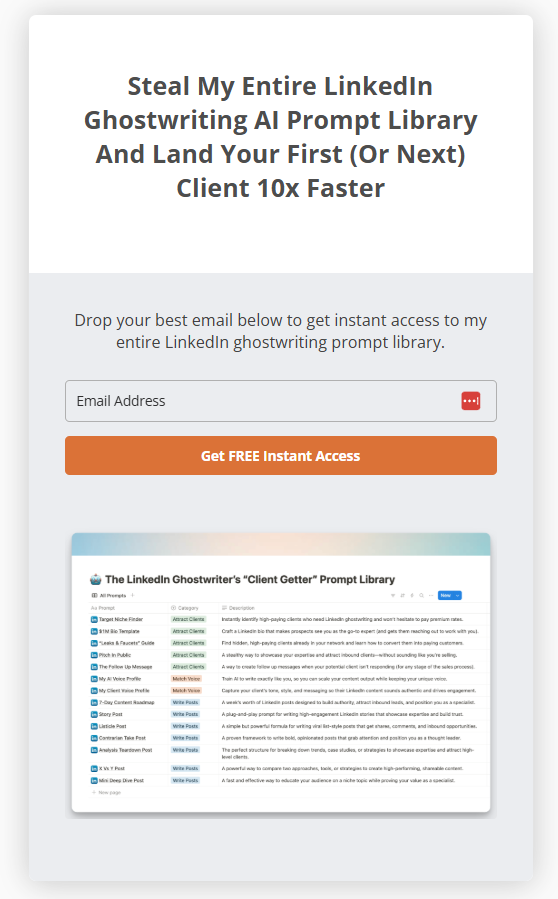
Or you can use your Email Service Provider to build a simple landing page like this one we did recently on Kit: https://pga.kit.com/prompt-library
Writing Your Giveaway Post
Your Viral Drop is attract new subscribers through one social post.
Remember, you’re not giving away the asset directly in the post. You will SEND the link to anyone who engages with your post.
This is very important (otherwise it won't go viral).
Let’s look at this example from our Premium Ghostwriting Blueprint Viral Drop:
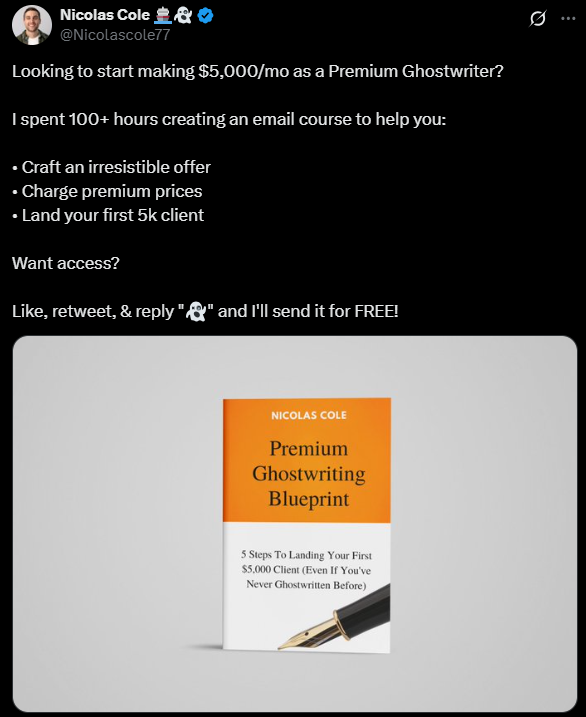
https://x.com/Nicolascole77/status/1664247744054145026
Let's break down the template of this giveaway post:
[Outcome] “Looking to start making $5,000/mo as a Premium Ghostwriter? You should start by doing 2 things: first, speaking to the outcome your target reader/customer wants, and second, naming the target reader directly. So here, you wouldn't just say, “Looking to start making $5,000/mo?” Because that could apply to ANYONE. We want to clarify this outcome by saying who it's for, specifically. (”…as a Premium Ghostwriter.”)
[Obstacle] “I spent 100+ hours creating an email course to help you.” Every good story needs an obstacle—and your target reader/customer needs to know that blood, sweat, and tears went into making this! (Otherwise, they won't value it as highly.) This could be:
TIME: How long did it take you to make? (Hours, Days, Weeks, Months, Years, Decades?)
COST: How much money did you have to spend to put this together? Or to acquire the information you're about to share? ($100? $1,000? $10,000? $100,000? Etc.)
ACCESS: Who did you have to talk to in order to create this? Who do you have access to, who has valuable information, that your target reader/customer would also want access to? (A world-class specialist? A famous person? A billionaire? Etc.)
[Benefits]: “Craft an irresistible offer. Charge premium prices. Land your first 5k client.” These are the benefits the target reader/customer will receive IF they “pay” with their attention. This is very, very important. In order for the reader/customer to know why they should give you their attention, they need to know what BENEFITS they are going to receive. And remember: tangible benefits (”Land your first 5k client”) are always better than intangible benefits (”Make more money!”). Be as specific as possible here (and refer back to the Title/Subtitle of your asset).
[CTA] “Want access?” Notice how this 1 simple sentence is the virtual equivalent of a red velvet rope. It says to readers/customers, “Not everyone can have this.” And what happens when you say, “Not everyone can have this?” EVERYONE WANTS IT!
[Directions] “Like, Retweet, and Comment “{emoji}” and I'll send it for FREE!” These are the tactical instructions you need to give readers/customers, telling them exactly what the trade is: “Do X and I'll give you Y.” From what we've found, at a minimum you should ask for a Like + Comment. And we recommend making the Comment something specific (like an emoji, or a specific phrase like “I want to ghostwrite!” in this example). Retweets and Shares are optional.
Using the above, this will become your Viral Drop Giveaway Post Template!
But just to really drive the point home, here it is in template form:
Want to {Desirable Outcome} as a {Target Reader/Customer}?

I spent {COST} creating {ASSET} to help you:

• {Benefit #1}
• {Benefit #2}
• {Benefit #3}

Want access?

Like & reply "{emoji}" and I'll send it for FREE!
And to show you how these kind of posts work on LinkedIn, here’s a recent one Dickie ran on LinkedIn:
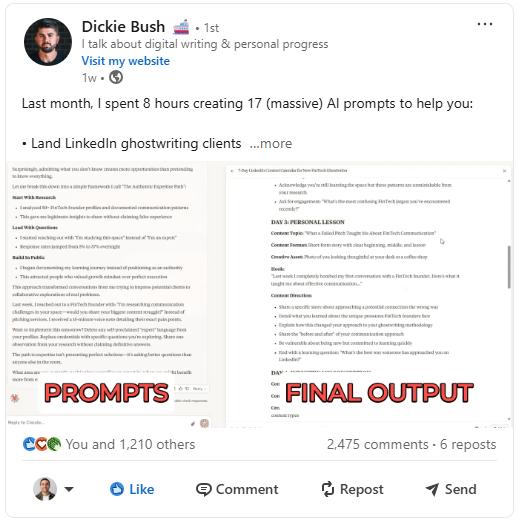
Here’s the LinkedIn post in template form:
Last month, I spent {X} hours creating {Asset} to help you:

• {Tangible Outcome 1}
• {Tangible Outcome 2}
• {Tangible Outcome 3}

And tons more.

In other words:

All you need to {Big Tangible Outcome}.

Now, full transparency:

{1-2 Sentences About How You Weren't Going To Share This — give a real reason!}

So, now I'm giving you the chance to get my {ASSET NAME} for FREE.

Want access?

✅ Like this post
✅ Comment “{WORD}”
✅ And send me a connection request if you haven’t yet (so I can DM you)

I’ll send it over via DMs ASAP.
Writing Your Delivery Message
This is the message that will get sent to the reader when they engage with the post.
(Note: how this is sent will vary from platform to platform—see the sections dedicated to LinkedIn and Twitter below).
Hey there!

So excited to hear you're looking to {achieve outcome your asset helps people unlock}!

Here's the link to download my {Asset Name}:

{Asset landing page link}

I've spent weeks working on this resource—and I honestly think you're going to find it super valuable.

Let me know if you have any questions as you go through it and enjoy!

{Link To Landing Page}

-{your name}
Writing Your Follow Up Post
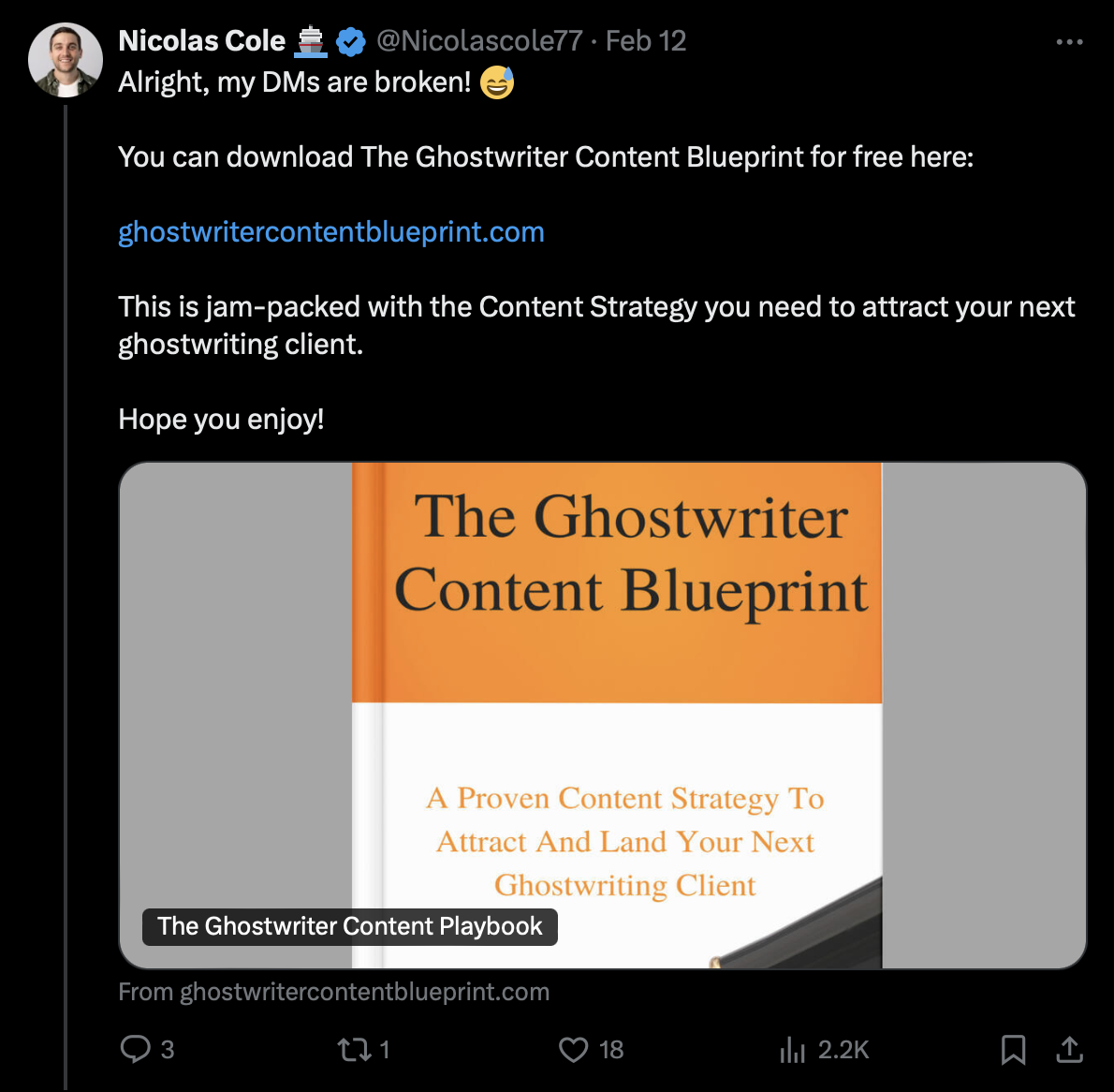
This is the copy you use in a reply to the original Viral Drop Giveaway you use after the post has gone viral.
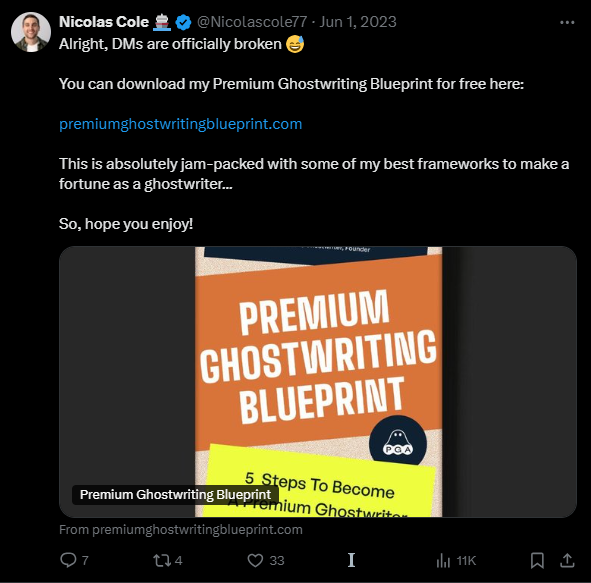
Alright, my DMs are officially broken 😅

You can download {Asset} for free below.

This is packed with all {Features} to {Outcome}.

Hope you enjoy!

{Link To Landing Page}
Writing Your Promo Email
This is an optional asset, but I highly recommend it.
This is an email to your existing newsletter subscribers to tell them about your asset and how to get access to it.
I send this email for 2 reasons:
This drives more engagement to your social post, causing it go viral faster.
This delivers a valuable asset to your existing subscribers (and gives them another reason to stay subscribed to your list… and become a customer of your digital product!).
Here’s a template:
Subject line: Want {Outcome Your Asset Delivers}?
Preview text: {Name Of Asset}
Copy:
Hey!
Are you looking to {Specific Outcome Your Asset Delivers}?
If so, you're in luck!
I spent the last {Month/Weeks/Days} creating {Asset Name} to help you:
{Benefit 1}
{Benefit 2}
{Benefit 3}
And tons more!
These are the exact frameworks I have used to {Outcome}.
And now, I’m giving them away for FREE!
To get early access, follow me, like the post below, and then reply “{Emoji}”—I'll send you a copy. {Link To Landing Page}
Let me know how you find it!
—Your Name
Writing Your Asset Delivery Sequence
This is a simple, 2-email sequence.
Email 1: Deliver The Asset. This first email is required because it delivers the asset you promised in your Giveaway Post.
Email 2: Introduce Your Newsletter/Other Resources. This second email is optional but highly recommended so you can introduce your new subscribers to your email list and products.
Note: You don’t have to send Email 2 to your existing subscribers BUT you could use this as an opportunity to remind them of the benefits of being on your newsletter or pitch them on buying a product.
Email 1: Deliver The Asset
Subject Line: {Name Of Asset}
Preview text: (link inside)
Copy:
Hey there!
Thanks so much for grabbing a copy of {Asset Name}—you can find it here.
This walks you through {Frameworks/Blueprint/Etc.} to help you:
{Outcome 1}
{Outcome 2}
{Outcome 3}
And more!
I’ve put the {Asset Name} in a Notion document—follow these steps to download it:
Click here to access {Asset Name}.
Go to the top right-hand corner and click “Duplicate”—this will place a copy of the doc into your Notion workspace.
Can’t wait to hear what you think!
Enjoy!
—{Your Name}
Email 2: Introduce Your Newsletter / Other Resources
Subject Line: {Outcome-Based Subject Line}
Preview text: {Number} more ****resources for you
Copy:
Hey there!
Have you been through the {Asset + Link} yet?
Inside it, I share {Features To Help You Achieve Outcome}.
And with that in mind, I wanted to let you know you have been automatically added to {Your Newsletter Name}.
In my newsletter, I will help you: {1-2 sentences describing what your newsletter delivers/promises}
{Outcome / Benefit 1}
{Outcome / Benefit 2}
{Outcome / Benefit 3}
But there’s another way I can help you.
Introducing: {Product Name}
{1-3 sentences + bullets on outcomes the product delivers}
Hundreds of students have taken the course and seen {Outcome}:
{Include Testimonials}
{CTA + Link}
That’s it!
Speak soon!
—{Your Name}
Executing A Viral Drop
This is easier to explain via screenshots so please follow the steps below.
Alright, now we have all the assets, it’s time to get your Viral Drop launched!
Step 1: Set Up Your Landing Page.
We recommend using Carrd or your Email Service Providers built-in landing page builder (if it has one) to build your opt-in page. They are easy and simple to use.
Use Namecheap.com to register your domain (or use a sub-domain from your ESP).
You can also use a tool like Fathom to track the opt-in rate on your landing page (and so monitor how well your page is performing, number of visits, etc).
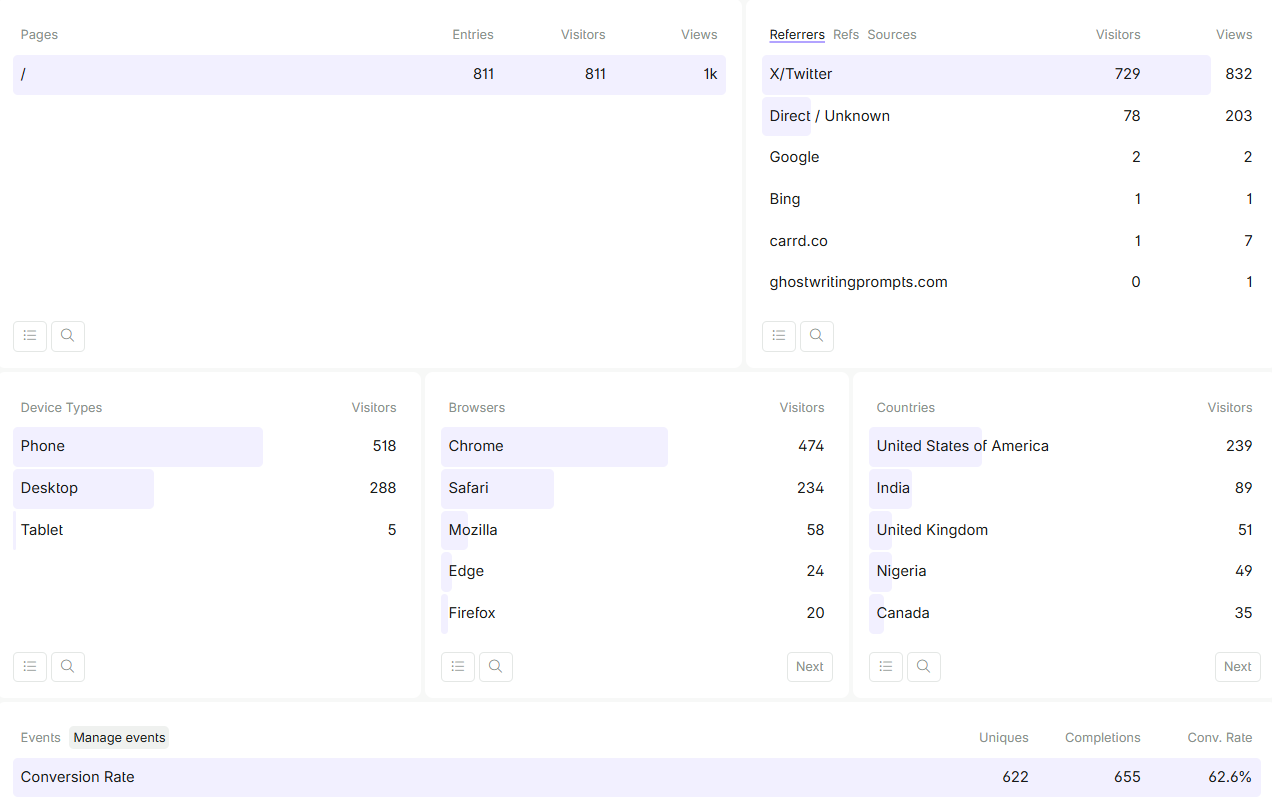
Step 2: Create The Asset Delivery Sequence In Your Email Automation Software.
Use the example emails above to create your delivery sequence (but note the nuances between new and existing subscribers).
At the very minimum, include the Asset Delivery Email. Then you can add new subscribers into your usual Welcome Sequence.
Step 3: Craft Your Social Post Settings.
Settings For Twitter:
We recommend Hypefury. You use this to automatically send a DM with the landing page link to anyone who takes the action you ask in your Giveaway Post.
Here’s a detailed step-by-step guide on how to craft your Hypefury settings:
Log in to Hypefury
Under “Earn,” go to “Auto-DMs”
Click “Start Campaign”
On the next page, fill out 4 items:
The copy for your Giveaway Post. Use the template above!
The copy you want to use for the DM that gets sent once the user takes the action you want. Again, use the template above.
The specific action(s) people need to complete in order to trigger the Auto-DM: We recommend choosing the “Reply To Tweet” option here.
The word/phrase that the reply should contain to trigger the Auto-DM: For this one, the goal is to keep it as simple and low-friction as possible (you don’t want to make it hard for people to engage with your post). Which is why I usually ask people to reply with an emoji or a single word (e.g., 👻, 🚢, etc).
Schedule your tweet!
Settings For LinkedIn:
You can use tools like Taplio to send Auto DMs on LinkedIn (and the process of setting this up is similar to Hypefury above).
BUT LinkedIn isn’t kind to users who use automation (especially if you go from using zero automation to going 100mph sending DMs on a Viral Drop).
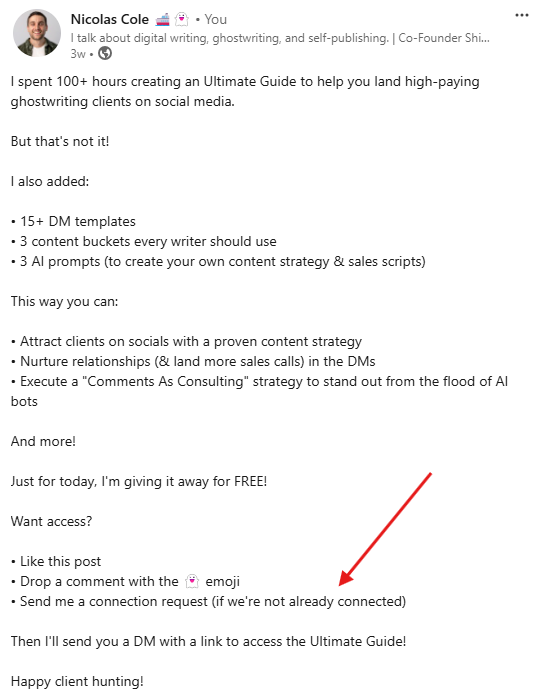
Instead, you can do this manually by saying that you must be connected to the person so you can send them a link to the asset (like below):
Step 4: Launch!
Once the post is live, you can monitor its progress inside Hypefury in the Auto-DMs section. It’ll tell you useful stats around how many DMs have already been sent and whether it’s still active.
(Even if you have a small following, you should notice an uptick in engagement relative to anything else you've published.)
Here are some things that are inevitably going to happen:
People will DM you saying they didn't receive the link. Most likely, this is because they didn't follow the instructions on your Giveaway post. (For example, Hypefury needs it to be exact in order to trigger the Auto-DM.) This is OK. You can either send them the link to your landing page directly, or just trust they will find the link once you drop it in the post as a comment in a few hours.
Your DMs might break. Twitter has a 1,000 per day DM limit. If you reach this, Twitter just pauses your DMs for 24 hours. This is fine. Not a big deal.
People might comment on the post again and say, “I didn't receive it!” This is actually a good thing, not a bad thing. Why? Because nothing makes other people want something more than knowing demand is SO HIGH that some people aren't even able to get in. Reverse psychology wins.
As a rule of thumb, you want to leave this giveaway post live for at least 24 hours—forcing people to Like & Comment (and letting any tools you have running Auto-DM them the link).
Step 5: Send The Promo Email As A Broadcast.
Use the template to send an email to your list (don’t forget to add the link to the post!) and create more engagement on your post.
Step 6: Finish The Drop With The Follow Up Post
After 24 hours, here's what you do next (on X, at least):
You respond to the giveaway post saying, “Well, this went more viral than I thought! My DMs are flooded, I can't keep up. Here's the link to the course! Enjoy!” (see the template above).
Or for LinkedIn, you can either:
Edit the post and add the landing page link to the body of the post.
Or keep sending people the link if they comment. The LinkedIn post lifecycle is always changing, and we’ve had Viral Drops running for WEEKS after the event, meaning you can keep collecting subs longer after you post the drop.
And that's the end.
Congrats! You just collected TONS of emails for $0!
I cannot stress enough how valuable this Viral Drop Growth System is.
With this giveaway technique, you can effectively capture thousands, tens of thousands, even hundreds of thousands of dollars worth of Customer Acquisition…. for free.
For example:
Let's say it costs you $7.82 to acquire someone's email address through paid advertising.
Well, our most Premium Ghostwriting 5-Day EEC Viral Drop captured over 1,000 emails in just the first 2 hours.
Which means, if we had tried to get those 1,000 emails through paid advertising, that would have cost us (1,000 x $7.82) = $7,820!
This might take a little bit of effort to setup, but it’s totally worth it!
Key takeaways
TODO - For Ray